Visual
Import
import {  // Astro wheel  generateAstroWheelSvg,  ASTRO_WHEEL_DEFAULT_VIEWBOX,  ASTRO_WHEEL_DEFAULT_ASPECT_SPECS,  ASTRO_WHEEL_ZODIAC_SIGNS,  ASTRO_WHEEL_POINT_GLYPHS,
  // Glyphs  generateGlyphSvg,  generateAstroGlyphSvg,  getAstroGlyph,  listAstroGlyphs,  ZODIAC_GLYPHS,  PLANET_GLYPHS,  ASPECT_GLYPHS,  ANGLE_GLYPHS,  ZODIAC_GLYPH_PRIMITIVES,  PLANET_GLYPH_PRIMITIVES,  ASPECT_GLYPH_PRIMITIVES,
  // Archeometer  generateArcheometerSvg,  getArcheometerRenderModel,  ARCHEOMETER_DEFAULT_VIEWBOX,  DEFAULT_ARCHEOMETER_UTTERANCE,
  // Tree of Life  generateTreeSvg,  getRouteActivations,  getTreeLayout,  getTreeRenderModel,  TREE_SVG_DEFAULT_VIEWBOX,  TREE_SPHERE_NAMES,  TREE_SPHERE_IDS,  TREE_PATH_IDS,} from 'kaabalah/visual';
Exports
generateAstroWheelSvggenerateGlyphSvggenerateAstroGlyphSvggetAstroGlyphlistAstroGlyphsASTRO_WHEEL_DEFAULT_VIEWBOXASTRO_WHEEL_DEFAULT_ASPECT_SPECSASTRO_WHEEL_ZODIAC_SIGNSASTRO_WHEEL_POINT_GLYPHSZODIAC_GLYPHSPLANET_GLYPHSASPECT_GLYPHSANGLE_GLYPHSZODIAC_GLYPH_PRIMITIVESPLANET_GLYPH_PRIMITIVESASPECT_GLYPH_PRIMITIVESgenerateArcheometerSvggetArcheometerRenderModelARCHEOMETER_DEFAULT_VIEWBOXDEFAULT_ARCHEOMETER_UTTERANCEDEFAULT_ARCHEOMETER_TRIANGLESDEFAULT_ARCHEOMETER_MUSICAL_NOTESDEFAULT_ARCHEOMETER_ZODIACDEFAULT_ARCHEOMETER_PLANETSgenerateTreeSvggetRouteActivationsgetTreeLayoutgetTreeRenderModelTREE_SVG_DEFAULT_VIEWBOXTREE_SPHERE_NAMESTREE_SPHERE_IDSTREE_PATH_IDS- Types:
AstroGlyphPrimitive,GlyphSvgOptions,AstroWheelPlanetGlyphKey,AstroWheelAspectGlyphKey,AstroWheelSvgOptions,AstroWheelPalette,AstroWheelPaletteOverrides,AstroWheelZodiacOptions,AstroWheelAspectOptions,AstroWheelHouseOptions,AstroWheelPointOptions,AstroWheelLayoutOptions,AstroWheelPointConnectorMode,AstroWheelRailVisibilityPreset,AstroWheelRailVisibility,AstroWheelPointSource,AstroWheelViewBox,AstroWheelZodiacSegment,AstroWheelHouseCusp,AstroWheelAngleMarker,AstroWheelPoint,AstroWheelArcConnector,AstroWheelAspectLine,ArcheometerSvgOptions,ArcheometerPalette,ArcheometerPaletteOverrides,ArcheometerRenderModel,ArcheometerGeometry,ArcheometerElementGeometry,ArcheometerTriangleGeometry,ArcheometerRing,ArcheometerRingId,ArcheometerUtterancePoint,ArcheometerTriangleSpec,ArcheometerTriangleLabel,ArcheometerMusicalNote,ArcheometerZodiacSign,ArcheometerPlanetaryPoint,TreeSvgOptions,TreeSvgPalette,TreeSvgCustomPalette,TreeSvgHighlights,TreeTargetActivationInput,RouteActivationOptions,TreeTargetState,TreeSvgDaathLayer,TreeSvgViewBox,TreeLayout,TreeLayoutMap,TreeLayoutPath,TreeLayoutCoordinate,TreeRenderModel,TreeRenderSphere,TreeRenderPath,TreeRenderSphereGeometry,TreeRenderPathGeometry,TreeRenderHitTarget,TreeRenderAnchor,TreeSphereName,TreeSphereId,TreePathId
Astrology Wheel
generateAstroWheelSvg(chart, options?)
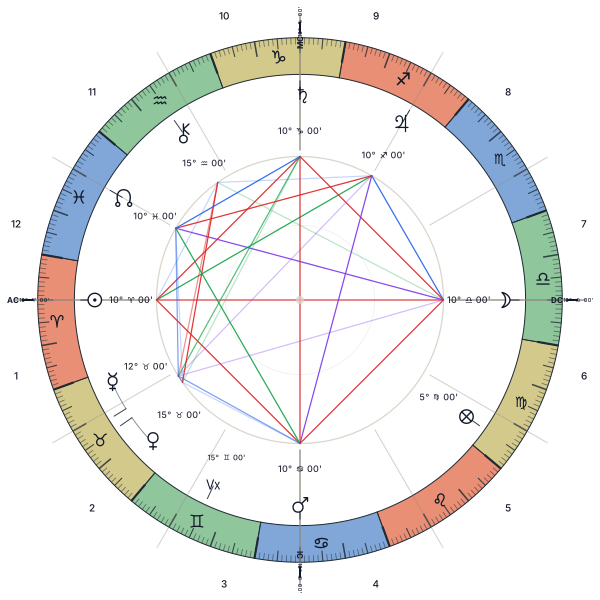
Renders a complete radial astrology wheel as an SVG string from a BirthChart returned by kaabalah/astrology. The output contains zodiac sign segments colored by element, house cusp lines, planet and node glyphs positioned around the wheel, and aspect lines connecting related planets. Part of Fortune and Vertex are included automatically when the chart provides them.
function generateAstroWheelSvg(chart: BirthChart, options?: AstroWheelSvgOptions): stringBasic usage
import { getBirthChart, HouseSystem } from 'kaabalah/astrology';import { generateAstroWheelSvg } from 'kaabalah/visual';
const chart = await getBirthChart({  date: { year: 1990, month: 1, day: 1, hour: 12, minute: 0 },  latitude: 40.7128,  longitude: -74.006,  houseSystem: HouseSystem.PLACIDUS,  timeZoneSettings: { timeZone: "America/New_York" },});
const svg = generateAstroWheelSvg(chart, {  width: 600,  height: 600,  background: "transparent",});
The returned string can be written to a .svg file, embedded in an HTML page, or used as the base layer below custom overlays. No React, DOM, or WASM runtime is required by the visual renderer itself — the only input is the already-computed BirthChart.
AstroWheelSvgOptions
interface AstroWheelSvgOptions { width?: number | string; height?: number | string; viewBox?: AstroWheelViewBox; // default: 0 0 600 600 background?: string | "transparent"; // default: "transparent" palette?: AstroWheelPalette; zodiac?: boolean | AstroWheelZodiacOptions; // segments/glyphs/ticks aspects?: boolean | AstroWheelAspectOptions; // default: true houses?: boolean | AstroWheelHouseOptions; // labels/cusp lines/angle labels points?: boolean | AstroWheelPointOptions; // birth planets/nodes/vertex excludeBodies?: readonly string[]; // render-only body filter layout?: AstroWheelLayoutOptions; // ring proportions/connectors padding?: number; title?: string;}Layer controls
Each visual layer is independent. Toggle any layer off without affecting the others:
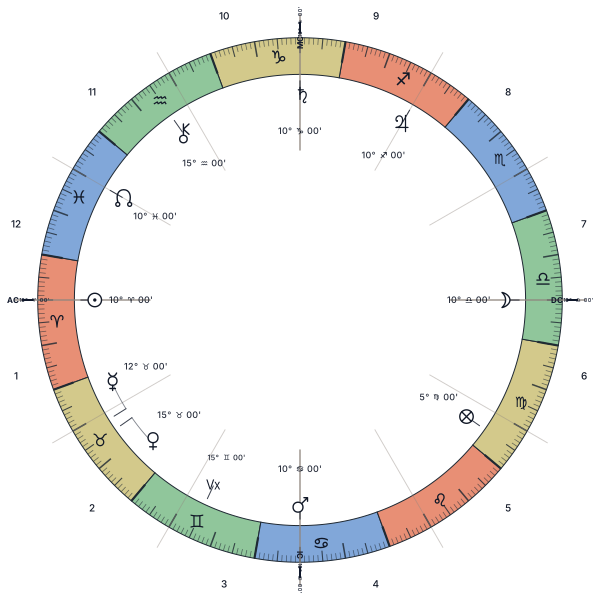
generateAstroWheelSvg(chart, { zodiac: false });   // strip zodiac segments, glyphs, and ticksgenerateAstroWheelSvg(chart, { houses: false });   // strip house cusps and ASC/MC labelsgenerateAstroWheelSvg(chart, { points: false });   // strip birth planets/nodes/vertexgenerateAstroWheelSvg(chart, { aspects: false });  // strip aspect lines
generateAstroWheelSvg(chart, {  zodiac: { glyphs: false },   // keep colored sign segments and ticks  houses: { labels: false },   // keep cusp lines, hide house numbers  points: {    nodes: false,              // keep planets, hide nodes    collisionThresholdDegrees: 6,  },});
Use excludeBodies when an app needs the full BirthChart for other panels but wants the wheel itself to omit specific bodies and their aspect lines:
generateAstroWheelSvg(chart, { excludeBodies: ["True Node", "Lilith True"],});Planet glyphs are rendered in a conventional Planet Band. Exact ticks, true anchors, aspect endpoints, and house membership stay tied to true longitude. The default output is glyph-first; degree, sign, minutes, and retrograde details are optional compact SVG details. Override palette.glyphHalo when the automatic halo color should not match the wheel background.
Wheel layout
Use layout when the default wheel proportions or displaced-label connectors need tuning. The default ring fractions are houses: 7, zodiac: 13, planets: 27, and aspects: 53.
const svg = generateAstroWheelSvg(chart, { layout: { rings: { planets: 32, aspects: 48, }, pointConnectors: "auto", // "auto" | "always" | "never" maxPointDisplacementDegrees: 20, rails: "compact", // "glyph-only" | "compact" | "full" | partial visibility map },});Planet glyphs may be angularly spaced for dense clusters, but zodiacal order is preserved and displacement is capped. Generated SVG draws a short band leader when true ticks and displayed glyphs differ. Aspect lines connect true positions on the structural aspect boundary, not displaced glyphs. That boundary remains visible when aspects: false, so house cusp spokes still end on the same inner wheel circle.
House cusps stay fixed. The renderer does not bend house boundaries with Boundary Notches; crowded glyphs are handled through bounded angular spreading and short leaders.
Compact position labels
Static SVG defaults to glyph-only planet labels. Compact position details can be enabled while preserving the same true ticks, houses, and aspect anchors:
generateAstroWheelSvg(chart, {  layout: { rails: "glyph-only" },});
generateAstroWheelSvg(chart, {  layout: {    rails: {      degree: true,      minutes: true,      sign: true,      retrograde: true,    },  },});
Aspect orbs
Pass aspectSpecs to override which aspects are drawn and their orbs. The renderer recomputes planet-to-planet aspects from the chart positions:
const svg = generateAstroWheelSvg(chart, { aspects: { aspectSpecs: [ { name: "conjunction", angle: 0, orb: 6 }, { name: "opposition", angle: 180, orb: 7 }, ], },});Transit, synastry, and progressed calculations belong in kaabalah/astrology. Render app-specific comparison layers outside the built-in astrology wheel SVG.
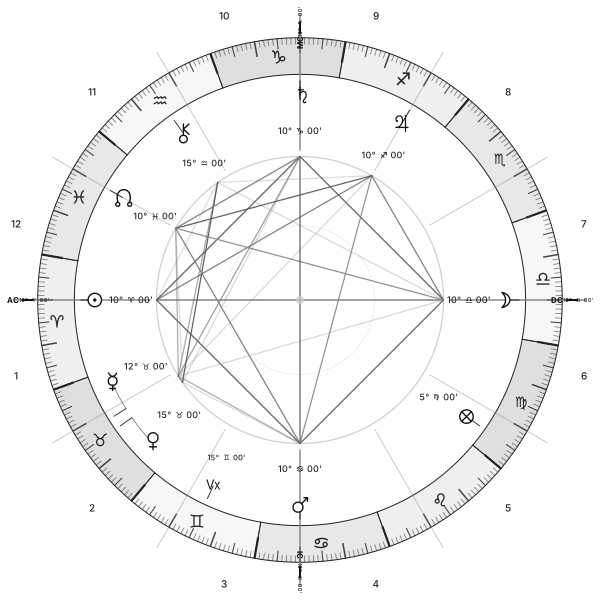
Wheel comparison
Glyphs
The visual module ships vector glyph definitions for zodiac signs, planets, aspects, and chart angles. The wheel renderer uses these same exported definitions, so downstream apps can render matching standalone icons or compose transit/synastry overlays without copying SVG files from the docs site.
getAstroGlyph(key) / listAstroGlyphs(category?)
Looks up reusable glyph definitions by canonical key or alias. Examples: "sun", "wheel-of-fortune", "quincunx", "asc".
import { getAstroGlyph, listAstroGlyphs } from 'kaabalah/visual';
const fortune = getAstroGlyph("wheel-of-fortune"); // PLANET_GLYPHS["pars fortunae"]const aspects = listAstroGlyphs("aspect");
generateAstroGlyphSvg(keyOrGlyph, options?)
Renders a named glyph definition as a standalone SVG string.
import { generateAstroGlyphSvg } from 'kaabalah/visual';
const asc = generateAstroGlyphSvg("asc", { size: 48, color: "#b1468d" });const quincunx = generateAstroGlyphSvg("quincunx", { size: 32 });ZODIAC_GLYPHS, PLANET_GLYPHS, ASPECT_GLYPHS, ANGLE_GLYPHS
Exported glyph-definition maps. Each value has { key, label, category, primitives, aliases }. Angle glyphs include circled ASC/MC style markers and a plain Vx Vertex glyph.
The lower-level primitive maps remain exported for custom renderers that want direct drawing instructions.
generateGlyphSvg(primitives, options?)
Renders any glyph primitive array as a standalone SVG string.
function generateGlyphSvg(primitives: readonly AstroGlyphPrimitive[], options?: GlyphSvgOptions): stringinterface GlyphSvgOptions { size?: number; // default: 48 color?: string; // stroke color, default: "#111827" strokeWidth?: number; // default: 0.14 fill?: "none" | string; // default: "none" background?: string | "transparent"; // default: "transparent"}import { generateGlyphSvg, PLANET_GLYPH_PRIMITIVES } from 'kaabalah/visual';
const svg = generateGlyphSvg(PLANET_GLYPH_PRIMITIVES.sun, { size: 64, color: "#1f2933",});ZODIAC_GLYPH_PRIMITIVES
Vector primitives for all 12 zodiac signs. These are also used internally by the astrology wheel renderer for zodiac segment labels.


import { ZODIAC_GLYPH_PRIMITIVES } from 'kaabalah/visual';
ZODIAC_GLYPH_PRIMITIVES.Aries;   // AstroGlyphPrimitive[]ZODIAC_GLYPH_PRIMITIVES.Pisces;
PLANET_GLYPH_PRIMITIVES
Vector primitives for planets and special points.


import { PLANET_GLYPH_PRIMITIVES } from 'kaabalah/visual';
PLANET_GLYPH_PRIMITIVES.sun;             // AstroGlyphPrimitive[]PLANET_GLYPH_PRIMITIVES.saturn;PLANET_GLYPH_PRIMITIVES["north node"];PLANET_GLYPH_PRIMITIVES["pars fortunae"];
ASPECT_GLYPH_PRIMITIVES
Vector primitives for aspect symbols.


import { ASPECT_GLYPH_PRIMITIVES } from 'kaabalah/visual';
ASPECT_GLYPH_PRIMITIVES.conjunction;    // AstroGlyphPrimitive[]ASPECT_GLYPH_PRIMITIVES.trine;ASPECT_GLYPH_PRIMITIVES.inconjunct;
ANGLE_GLYPHS
Reusable chart angle glyphs for overlay controls, legends, and custom chart layers.


AstroGlyphPrimitive
All glyph maps share the same primitive type:
type AstroGlyphPrimitive = | { kind: "path"; d: string } | { kind: "circle"; cx: number; cy: number; r: number } | { kind: "line"; x1: number; y1: number; x2: number; y2: number } | { kind: "polyline"; points: string } | { kind: "text"; text: string; x?: number; y?: number; fontSize?: number; fontWeight?: string | number } | { kind: "raw"; markup: string };Coordinates are normalized to roughly -1…1. Scale and translate to your target viewport before rendering.
Archeometer
generateArcheometerSvg(options?)
Generates a complete Archeometer SVG string from deterministic render tables. The output contains the dual degree crown, utterance rings, trigone geometry, zodiac and planetary glyph rings, chromic rays, white rays, and solar center.
function generateArcheometerSvg(options?: ArcheometerSvgOptions): stringBasic usage
import { generateArcheometerSvg } from 'kaabalah/visual';
const svg = generateArcheometerSvg({  width: 900,  height: 900,  background: "transparent",  title: "The Cosmological Archeometer",});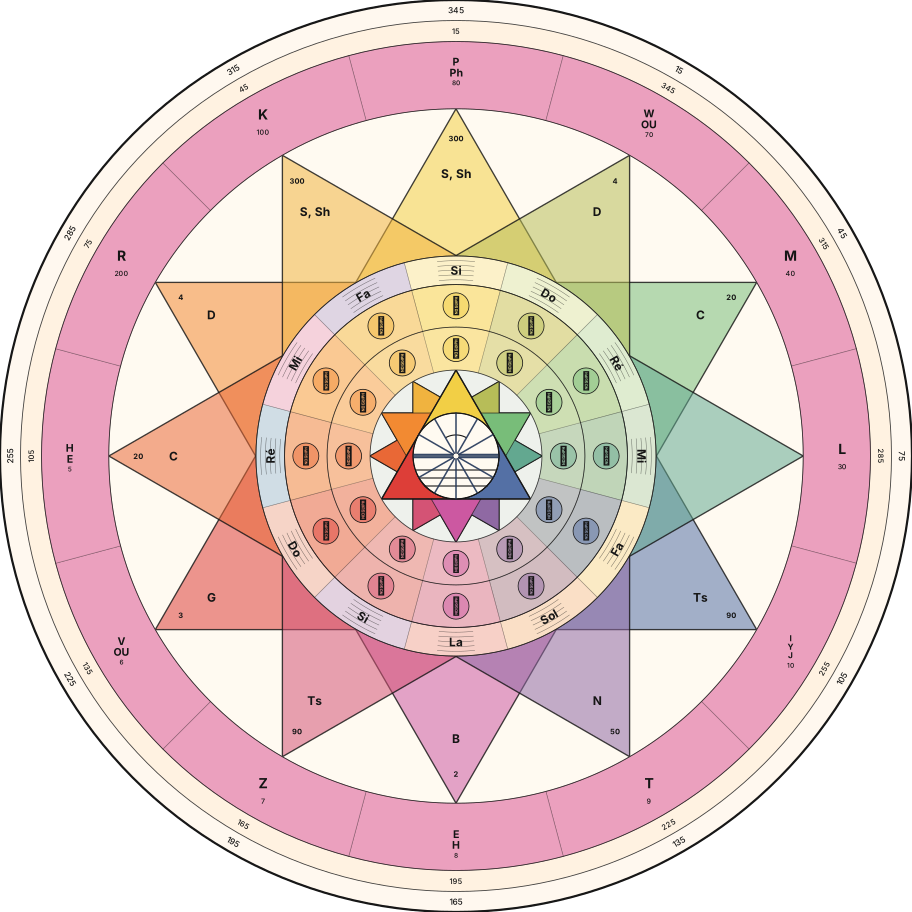
ArcheometerSvgOptions
interface ArcheometerSvgOptions { width?: number | string; height?: number | string; viewBox?: ArcheometerSvgViewBox; // default: 0 0 912 912 background?: string | "transparent"; // default: "transparent" palette?: ArcheometerPalette; padding?: number; rotationDegrees?: number; // 0 degrees is north; positive rotates clockwise degreeLabelEvery?: number; layers?: ArcheometerLayerOptions; utterance?: readonly ArcheometerUtterancePoint[]; triangles?: readonly ArcheometerTriangleSpec[]; triangleLabels?: readonly ArcheometerTriangleLabel[]; musicalNotes?: readonly ArcheometerMusicalNote[]; zodiacSigns?: readonly ArcheometerZodiacSign[]; planetaryPoints?: readonly ArcheometerPlanetaryPoint[];}Use getArcheometerRenderModel() when you need the normalized ring geometry, resolved palette, default correspondence tables, and per-element geometry without serializing SVG.
import { getArcheometerRenderModel } from 'kaabalah/visual';
const model = getArcheometerRenderModel();
model.rings;                         // normalized ring radiimodel.geometry.utterancePoints;       // anchors and hit targets for letters/numbersmodel.geometry.triangles;             // trigone vertices, centroids, paths, hit targetsmodel.geometry.triangleLabels;        // label anchorsmodel.geometry.musicalNotes;          // note anchorsmodel.geometry.zodiacSigns;           // zodiac glyph anchors and hit targetsmodel.geometry.planetaryPoints;       // planet glyph anchors and hit targetsmodel.geometry.degreeTicks;           // degree crown anchorsmodel.geometry.rays;                  // white ray line geometrymodel.geometry.center;                // solar center anchor and hit target
Generated SVG consumes the same model-level geometry contract: source data remains available on each element, while anchor and hitTarget let React, Canvas, or app-specific renderers place tooltips and interaction zones without parsing SVG markup.
import { DEFAULT_ARCHEOMETER_UTTERANCE, generateArcheometerSvg } from 'kaabalah/visual';
const svg = generateArcheometerSvg({  utterance: DEFAULT_ARCHEOMETER_UTTERANCE.map((point) =>    point.id === "y"      ? { ...point, letter: "Ya", number: 11, color: "#123456" }      : point  ),});
Tree of Life
generateTreeSvg(options?)
Generates a complete Tree of Life SVG string. The output contains 11 sphere circles and 22 path lines laid out on the canonical Kabbalistic grid, with radial gradient highlights baked in.
function generateTreeSvg(options?: TreeSvgOptions): stringAll options are optional. Calling generateTreeSvg() with no arguments produces a full-color SVG at the default viewBox size with a white background.
TreeSvgOptions
interface TreeSvgOptions { width?: number | string; // SVG width attribute (omitted if not set) height?: number | string; // SVG height attribute (omitted if not set) viewBox?: TreeSvgViewBox; // override coordinate space (default: 0 0 286 561) background?: string | "transparent"; // fill color or "transparent" (default: "white") palette?: TreeSvgPalette; // color scheme (default: "color") system?: SystemKey; // "kaabalah" | "hermetic-qabalah" | "lurianic-kabbalah" (default: "kaabalah") daathLayer?: TreeSvgDaathLayer; // "front" | "back" (default: "front") highlights?: TreeSvgHighlights; // targeted path/sphere recolors layered on top of the base renderer activations?: readonly TreeTargetActivationInput[]; // activation-aware prominence and hit geometry metadata}Basic usage
import { generateTreeSvg } from 'kaabalah/visual';
// Full-color SVG, white background, default sizeconst svg = generateTreeSvg();
// Monochrome, transparent background, explicit pixel dimensionsconst svg = generateTreeSvg({  width: 400,  height: 785,  background: "transparent",  palette: "monochrome",});
// Write to file (Node.js)import { writeFileSync } from 'node:fs';writeFileSync("tree.svg", generateTreeSvg({ background: "transparent" }));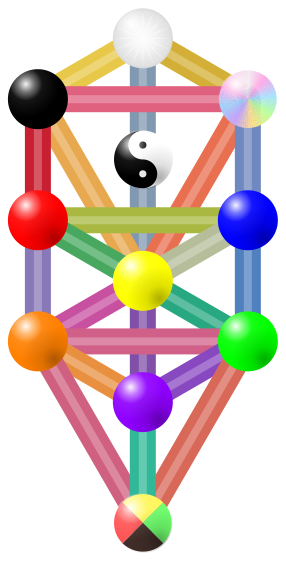
ViewBox
The default coordinate space is 0 0 286 561 (exported as TREE_SVG_DEFAULT_VIEWBOX). You can override it without affecting the width/height pixel size — the SVG uses preserveAspectRatio="xMidYMid meet".
interface TreeSvgViewBox { minX?: number; // default: 0 minY?: number; // default: 0 width: number; height: number;}// Embed in a larger canvas with paddingconst svg = generateTreeSvg({ viewBox: { minX: -20, minY: -20, width: 326, height: 601 },});Palette
TreeSvgPalette is a union of three forms:
type TreeSvgPalette = "color" | "monochrome" | TreeSvgCustomPalette;"color" (default)
Sphere and path colors are read from the Tree of Life color data. Special spheres receive distinctive rendering:
- Kether — white sunburst with radial facets
- Chokhmah — iridescent shimmer
- Daath — yin-yang symbol
- Malkuth — four-quadrant color slices
- Paths keep their layered treatment, with the outer edge rendered as a darker version of the path hue instead of a neutral outline.
"monochrome"
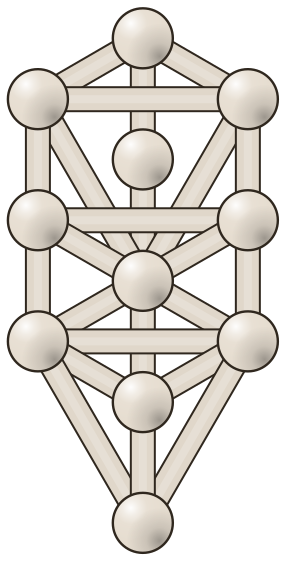
All spheres render in warm off-white (#e6ddd0) with dark outlines (#2f271e). Paths are uniform (#e0d7ca). Special sphere rendering is disabled.
Custom palette — TreeSvgCustomPalette
Fine-grained control over every visual element:
interface TreeSvgCustomPalette { defaultSphereFill?: string; defaultPathColor?: string; sphereFills?: Partial<Record<TreeSphereId, string | string[]>>; pathColors?: Partial<Record<TreePathId, string>>; pathEdgeColor?: string; sphereStrokeColor?: string; sphereStrokeWidth?: number; pathHighlightColor?: string; pathHighlightOpacity?: number; specialSphereMode?: "preserve" | "plain";}sphereFills accepts either a single hex string or an array of hex strings (used for multi-color rendering like Malkuth’s four quadrants). Unspecified spheres fall back to defaultSphereFill.
specialSphereMode:
"preserve"— Kether, Chokhmah, Daath, and Malkuth render with their special effects"plain"— all spheres render as simple filled circles (default for custom palettes)
import { generateTreeSvg } from 'kaabalah/visual';
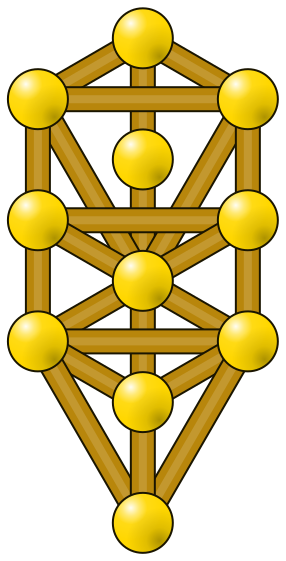
const svg = generateTreeSvg({  background: "#050315",  palette: {    defaultSphereFill: "#ffd700",    defaultPathColor: "#ffd700",    pathEdgeColor: "#2a2418",    sphereStrokeColor: "#2a2418",    sphereStrokeWidth: 2,    specialSphereMode: "plain",  },});
Palette comparison
Highlights
highlights is the additive way to selectively recolor only the paths and spheres you care about while leaving every unmentioned element exactly as the current renderer would draw it.
interface TreeSvgHighlights { paths?: Partial<Record<TreePathId, string>>; spheres?: Partial<Record<TreeSphereId, string | string[]>>; specialSphereMode?: "preserve" | "plain";}highlights.pathsoverrides only the main color of the specified path lines. The existing edge and highlight layers stay intact.highlights.spheresoverrides only the specified sphere fills. Unmentioned spheres keep their normal renderer output.highlights.specialSphereModecontrols only highlighted special spheres. It defaults to"preserve", so highlightedKether,Chokhmah,Daath, andMalkuthkeep their special renderer structure unless you opt into"plain".- Arrays are mainly useful for multi-fill spheres like
Malkuth; a single string works for ordinary sphere tinting.
import { generateTreeSvg } from 'kaabalah/visual';import { id, KaabalahTypes } from 'kaabalah/core';
const svg = generateTreeSvg({  background: "#fff",  highlights: {    paths: {      [id(KaabalahTypes.PATH, "1")]: "#d97706",    },    spheres: {      [id(KaabalahTypes.SPHERE, "Kether")]: "#fde68a",      [id(KaabalahTypes.SPHERE, "Malkuth")]: [        "#facc15",        "#f59e0b",        "#b45309",        "#fef3c7",      ],    },  },});
This is the intended downstream contract for apps: request selective recolors from kaabalah-lib instead of masking or rebuilding the SVG app-side.
When you want to mute every non-selected node to a single neutral color while keeping selected special spheres canonical, set highlights.specialSphereMode: "plain" and leave the selected nodes unmentioned:
import { generateTreeSvg, TREE_PATH_IDS, TREE_SPHERE_IDS } from 'kaabalah/visual';import { id, KaabalahTypes } from 'kaabalah/core';
const muted = "#aaa";const selectedPathId = id(KaabalahTypes.PATH, "1");const selectedSphereIds = [  id(KaabalahTypes.SPHERE, "Kether"),  id(KaabalahTypes.SPHERE, "Chokhmah"),];
const svg = generateTreeSvg({  background: "#fff",  highlights: {    specialSphereMode: "plain",    paths: Object.fromEntries(      TREE_PATH_IDS        .filter((pathId) => pathId !== selectedPathId)        .map((pathId) => [pathId, muted])    ),    spheres: Object.fromEntries(      TREE_SPHERE_IDS        .filter((sphereId) => !selectedSphereIds.includes(sphereId))        .map((sphereId) => [sphereId, muted])    ),  },});
Daath Layer
By default (daathLayer: "front"), Daath renders in the normal front sphere layer above all paths. Setting daathLayer: "back" moves Daath behind the paths — useful when you want paths to visually cross over Daath. A transparent hit-area circle (pointer-events="all", data-node-id="sphere:Daath") is placed last in the SVG so interactive clicks on Daath still work.
const svg = generateTreeSvg({ daathLayer: "back" });Daath layer comparison
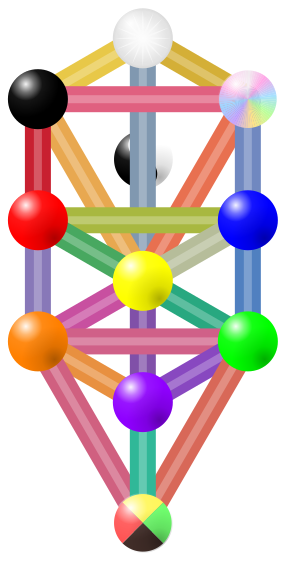
getTreeRenderModel(options?)
Returns the canonical layout together with activation-aware geometry and metadata for every sphere and path. Use this when an app needs stable tooltip anchors, hit targets, or prominence information without rebuilding the tree math locally.
function getTreeRenderModel(options?: TreeSvgOptions): TreeRenderModelThe model includes:
- canonical viewBox and rendered scale
- layer order
- sphere and path geometry in both percentage space and viewBox units
- tooltip anchors
- invisible hit target geometry in the same viewBox coordinate system as the base SVG
- canonical color and material metadata
- activation state with normalized strength
This is the intended downstream contract for interactive tree surfaces that need to place their own overlays or tooltips. Use geometry.viewBoxUnits for SVG rings, hit targets, and path strokes so circles stay circular. Use geometry.percentages.anchor when you need CSS-positioned HTML tooltips above the map.
Activation usage with semantic map data
kaabalah/semantic owns the marker and correspondence rules. kaabalah/visual owns the target geometry and activation rendering.
import { buildKaabalisticMapData } from 'kaabalah/semantic';import { generateTreeSvg, getTreeRenderModel } from 'kaabalah/visual';
const mapData = buildKaabalisticMapData({  numerology: new Date("1990-01-01T12:00:00Z"),});
const targets = [  ...mapData.spheres.map((sphere) => ({ id: sphere.id, type: "sphere" as const })),  ...mapData.paths.map((path) => ({ id: path.id, type: "path" as const })),];const maxCount = Math.max(  1,  ...targets.map((target) => mapData.countsById[target.id]?.total ?? 0));
const activations = targets.map((target) => {  const count = mapData.countsById[target.id]?.total ?? 0;
  return {    targetId: target.id,    targetType: target.type,    count,    total: mapData.markers.length,    strength: count / maxCount,    state: count > 0 ? "active" as const : "inactive" as const,  };});
const svg = generateTreeSvg({  background: "transparent",  activations,});const model = getTreeRenderModel({ activations });
Rendering routes
Use getRouteActivations when a topology route should light up the same targets accepted by generateTreeSvg and getTreeRenderModel.
import { getTreeTopology } from 'kaabalah/core';import { generateTreeSvg, getRouteActivations } from 'kaabalah/visual';
const route = getTreeTopology().getRoute("lightning");const activations = route ? getRouteActivations(route, { state: "selected" }) : [];const svg = generateTreeSvg({ background: "transparent", activations });
getTreeLayout(system?)
Returns the canonical layout data for the Tree of Life without rendering any SVG. Use this to build custom renderers, overlays, or interactive diagrams.
function getTreeLayout(system?: SystemKey): TreeLayoutsystem defaults to "kaabalah". Valid values: "kaabalah", "hermetic-qabalah", "lurianic-kabbalah".
TreeLayout
interface TreeLayout {  system: SystemKey;  viewBox: Required<TreeSvgViewBox>;  // { minX, minY, width, height }  sphereOrder: TreeSphereId[];        // 11 sphere IDs in draw order  pathOrder: TreePathId[];            // 22 path IDs in draw order  percentages: TreeLayoutMap;         // coordinates as 0–100 percentages  viewBoxUnits: TreeLayoutMap;        // coordinates in viewBox pixel units}
interface TreeLayoutMap {  spheres: Record<TreeSphereId, TreeLayoutCoordinate>;  paths:   Record<TreePathId,   TreeLayoutPath>;}
interface TreeLayoutCoordinate {  x: number;  y: number;}
interface TreeLayoutPath {  fromId: TreeSphereId;  toId:   TreeSphereId;  from:   TreeLayoutCoordinate;  to:     TreeLayoutCoordinate;}
percentages gives coordinates as percentages of the viewBox dimensions (0–100), making them resolution-independent. viewBoxUnits gives the same coordinates already scaled to the default 286 × 561 viewBox.
Example
import { getTreeLayout, TREE_SVG_DEFAULT_VIEWBOX } from 'kaabalah/visual';import { id, KaabalahTypes } from 'kaabalah/core';
const layout = getTreeLayout();
// Kether sits at roughly the top-center of the canvaslayout.percentages.spheres[id(KaabalahTypes.SPHERE, "Kether")];// { x: 49.94, y: 6.83 }
layout.viewBoxUnits.spheres[id(KaabalahTypes.SPHERE, "Kether")];// { x: 142.83, y: 38.32 }
// Path 1 connects Kether to Chokhmahlayout.percentages.paths[id(KaabalahTypes.PATH, "1")];// { fromId: "sphere:Kether", toId: "sphere:Chokhmah",//   from: { x: 49.94, y: 6.83 }, to: { x: 86.66, y: 17.68 } }
// Scale to a custom canvasconst canvasWidth = 600;const canvasHeight = 1175;const ketherX = layout.percentages.spheres[id(KaabalahTypes.SPHERE, "Kether")].x / 100 * canvasWidth;
Constants
TREE_SVG_DEFAULT_VIEWBOX
The canonical viewBox for all SVG output:
const TREE_SVG_DEFAULT_VIEWBOX: Required<TreeSvgViewBox> = { minX: 0, minY: 0, width: 286, height: 561,};TREE_SPHERE_NAMES
A readonly tuple of all 11 sphere names in draw order:
const TREE_SPHERE_NAMES = [ "Kether", "Chokhmah", "Binah", "Daath", "Chesed", "Geburah", "Tiphareth", "Netzach", "Hod", "Yesod", "Malkuth",] as const;TREE_SPHERE_IDS
Sphere node IDs corresponding to TREE_SPHERE_NAMES, in the same order. Each ID has the form "sphere:<Name>".
TREE_SPHERE_IDS[0] // "sphere:Kether"TREE_SPHERE_IDS[6] // "sphere:Tiphareth"TREE_PATH_IDS
Path node IDs for paths 1–22 in ascending order. Each ID has the form "path:<N>".
TREE_PATH_IDS[0] // "path:1"TREE_PATH_IDS[21] // "path:22"CLI
The CLI can render both visual modules directly.
Astrology wheel
Use astrology:wheel to calculate a chart and pass it through generateAstroWheelSvg:
# Emit a compact JSON payload containing only the SVGkaabalah astrology:wheel 1990-01-15 14:30 --lat=40.7128 --lon=-74.006 --json --compact --fields=svg
# Write the SVG to diskkaabalah astrology:wheel 1990-01-15 14:30 --lat=40.7128 --lon=-74.006 --background=transparent --output=chart.svg --json
Pass advanced static SVG options through --input-json as wheelOptions:
kaabalah astrology:wheel --input-json='{"date":"1990-01-15","time":"14:30","lat":40.7128,"lon":-74.006,"wheelOptions":{"background":"transparent","aspects":false}}' --json --compact --fields=svgTree of Life
The existing tree:* CLI namespace can inspect the same visual contracts:
# Generate an SVG filekaabalah tree:svg --background=transparent --output=tree.svg --json
# Preview an activated SVG from a reusable activation payloadkaabalah tree:svg --background=transparent --activations=activations.json --json --compact --fields=svg
# Inspect anchors and hit targets for agents or custom rendererskaabalah tree:layout --render-model --activations=activations.json --json --compact
--activations accepts either a raw JSON array of TreeTargetActivationInput objects or an object with an activations array. Keep semantic marker creation in kaabalah/semantic; use the CLI activation payload only as a visual inspection format.